How Do I Turn Trade Alerts On or Off?
You manage trade alerts from the Trade Alerts page inside your account. First, log in at course.options.cafe, then open the account menu in the top-right corner and click Trade Alerts.
Already logged in? You can jump straight to the Trade Alerts settings page in your account.
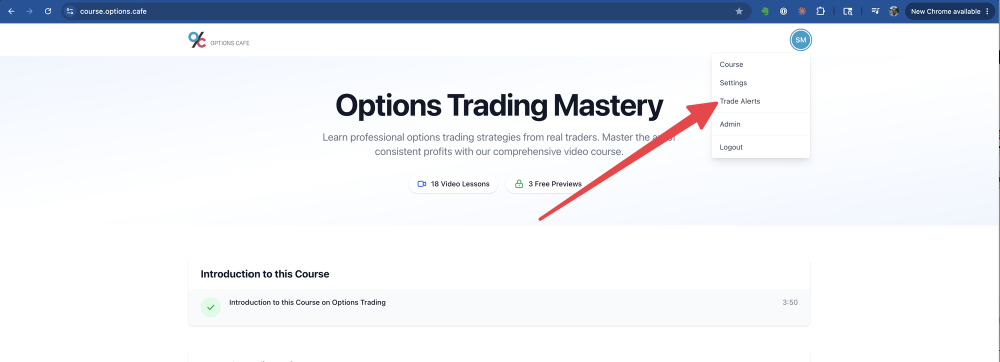
On the Trade Alert Settings page you can fine-tune everything:
- Set the Alert Email — the address your alerts are sent to. It can be different from your login email.
- Toggle each strategy on or off: 0-DTE SPX Iron Butterflies, Put Credit Spreads SPY, and The Wheel Strategy.
- Click Save Settings.
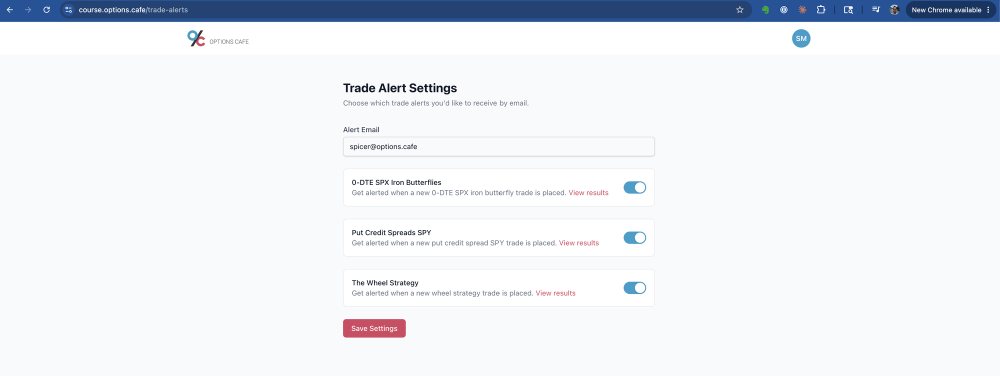
Changes take effect right away for new trades, and every strategy starts switched off until you opt in. Trade alerts are included with the course at no extra cost.
Each strategy also has a View results link so you can review its track record on our results pages before subscribing. If you'd rather stop all alerts, here's how to unsubscribe.